


Table of Contents
- What You'll Need Before Troubleshooting
- How to Troubleshoot Home Oxygen Concentrator Issues: Power and Electrical Connections
- Checking for Tubing Kinks, Blockages, and Airflow Restrictions
- How to Clean Oxygen Concentrator Filters and Intake Vents
- Understanding Oxygen Concentrator Alarm Codes and Indicator Lights
- Troubleshooting Low Oxygen Flow and Pressure Issues
- Oxygen Concentrator Maintenance Schedule and Preventative Care
- Addressing Device Overheating and Battery Health Issues
- Frequently Asked Questions
Last Updated: September 22, 2026
What You'll Need Before Troubleshooting
Before you start troubleshooting your home oxygen concentrator, gather a few basic items. You'll need a clean, dry cloth or soft brush for cleaning. Keep your user manual nearby, it contains specific details about your device model. A flashlight helps you see inside vents and tubing clearly. Have your device's power cord accessible to check for damage.

Make sure you're in a well-lit space where you can work safely. Never troubleshoot while the device is running or connected to oxygen delivery. Allow at least 30 minutes for the process so you're not rushed.
Knowing what to expect makes troubleshooting less stressful. Most issues fall into a few categories: power problems, blocked tubing, dirty filters, or low oxygen flow. Understanding these categories helps you identify the problem faster.
How to Troubleshoot Home Oxygen Concentrator Issues: Power and Electrical Connections
Power and electrical issues are among the most common reasons a home oxygen concentrator stops working. Before assuming something is broken, check these basics first.
Check the power cord and outlet
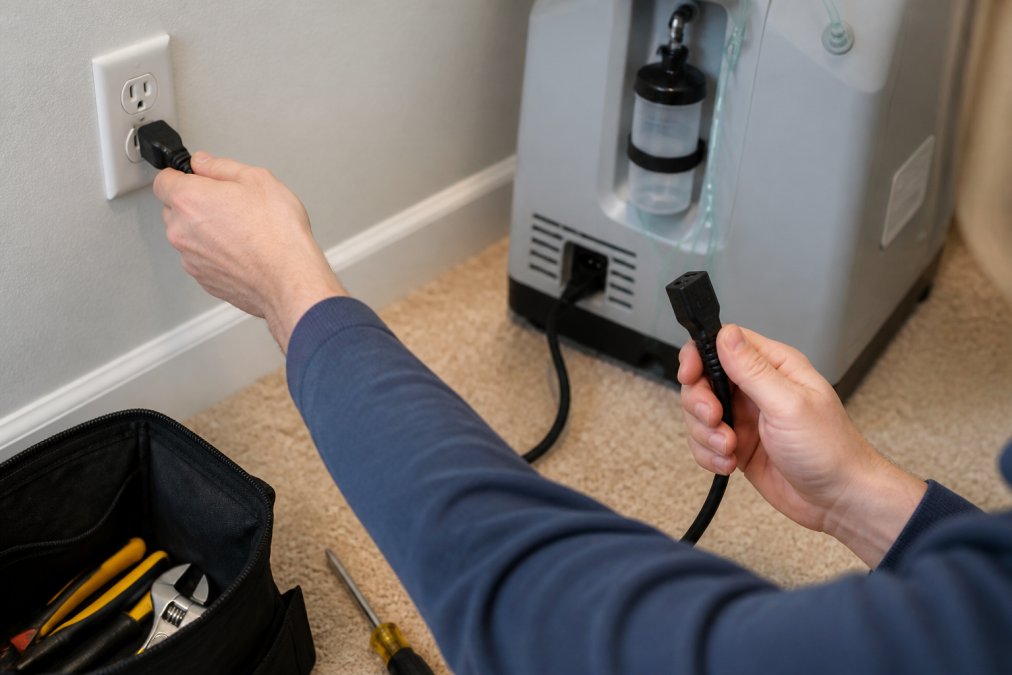
Start by examining the power cord from end to end. Look for cuts, fraying, or visible damage to the insulation. A damaged cord is a safety hazard and must be replaced immediately.
Next, plug the device into a different electrical outlet. The original outlet may be faulty or turned off. Try an outlet you know works, one that powers a lamp or phone charger, for example. This simple step solves many apparent device failures.
Check that the outlet itself is functioning. Plug another device into it to confirm power is reaching that location. If the outlet is dead, contact an electrician before using the concentrator there.
Inspect the plug prongs for corrosion or discoloration. Clean prongs gently with a dry cloth if needed. Never use water or cleaning solutions on electrical connections.
Verify the power switch and indicator lights
Locate the power switch on your device. Press it firmly and hold for a few seconds. Some models require a longer press to activate. Listen for a humming sound, this indicates the motor is running.
Check the indicator lights on your device's control panel. Most concentrators have lights that show power status, oxygen flow, and alarm conditions. Refer to your user manual to understand what each light means.
A green light typically indicates normal operation. A red or amber light usually signals an alarm condition. If you see a warning light, note its color and pattern, this information helps you identify the specific problem.
Checking for Tubing Kinks, Blockages, and Airflow Restrictions
Kinked or blocked tubing is one of the most common causes of low oxygen delivery. The good news is this problem is usually easy to spot and fix.
Inspect the nasal cannula and tubing
Start at the nasal cannula, the small plastic tubes that go in your nose. Check that both prongs are clean and unobstructed. Look for dried mucus, dust, or debris blocking the openings.
Follow the tubing from the cannula back to the device. Run your fingers along the entire length, feeling for kinks or pinches. Tubing often gets bent when wrapped around furniture or under pillows.
Straighten any kinked sections gently. Avoid sharp bends or tight coils. The tubing should lay in loose, natural curves without pressure points.
Check where the tubing connects to the device. Make sure the connection is tight and fully seated. A loose connection causes oxygen leaks and reduces flow to the cannula.
Clear blockages in the oxygen delivery system
Look inside the tubing for visible blockages. Hold a section up to a light and look through it. You should see clear space inside.
If you spot debris, try to flush it out gently. Disconnect the tubing from both ends. Use a soft, flexible object like a plastic rod or straightened coat hanger to push debris out. Never use sharp objects that could puncture the tubing.
Rinse the tubing with warm water if allowed by your manual. Some manufacturers recommend this; others do not. Check your device instructions before using water.
Reconnect all tubing securely after clearing blockages. Make sure each connection clicks or seats fully into place. Loose connections reduce oxygen flow significantly.
Contec OC3B Oxygen Concentrator (3L) →
Ensuring that the cannula remains free of obstructions is essential for consistent flow, though even with optimal equipment performance, you may still need to manage nasal irritation to maintain comfort during extended therapy.How to Clean Oxygen Concentrator Filters and Intake Vents
Dirty filters and vents restrict airflow and reduce oxygen output. Regular cleaning keeps your device working at full capacity.
Remove and inspect filters
Turn off the device and unplug it before touching filters. Locate the filter compartment, usually on the side or back of the unit. Check your manual for the exact location on your model.
Remove the filter carefully. Look at its surface for dust, dirt, or discoloration. A clean filter should be white or light gray. A dark, clogged filter needs cleaning.
Tap the filter gently against a trash can to dislodge loose dust. Do not slap it hard or shake it vigorously, this can damage the filter material.
For deeper cleaning, use a soft brush or cloth to wipe the filter surface. Never rinse filters with water unless your manual specifically allows it. Most foam and pleated filters are damaged by water.
Clean the intake vent and housing
The intake vent pulls air into the device. This vent gets dusty and needs regular cleaning. Locate the intake vent on your concentrator, it's usually a grille or mesh opening.
Use a soft brush or cloth to wipe away dust from the vent openings.
Understanding Oxygen Concentrator Alarm Codes and Indicator Lights
Alarm codes and indicator lights communicate device status and problems. Learning what they mean helps you respond quickly.
| Indicator Light | Color | Meaning | Action |
|---|---|---|---|
| Power | Green | Device is on and running | Normal operation |
| Power | Red/Amber | Device is off or error exists | Check power switch or manual |
| Oxygen Flow | Green | Normal oxygen output | Device working properly |
| Oxygen Flow | Red/Amber | Low oxygen or blockage | Check tubing and filters |
| Alarm | Red | Critical error or malfunction | Stop use and contact provider |
| Alarm | Amber | Warning condition | Review manual and troubleshoot |
Common alarm codes and what they mean
Different devices use different codes. Some use numbers, others use colored lights or sounds. Your user manual lists the specific codes for your model.
Responding to low flow rate and pressure drop alerts
When you see a low flow alert, first check that the flow rate setting is correct. The device may be set to deliver less oxygen than you need. Adjust the setting according to your doctor's prescription.
Troubleshooting Low Oxygen Flow and Pressure Issues
Low oxygen flow frustrates users and affects treatment effectiveness. Most cases have simple causes you can fix yourself.
Check oxygen output settings
Your device has controls to adjust oxygen flow rate. The dial or buttons set how much oxygen flows to the cannula. Check that the setting matches your doctor's prescription.
Inspect the humidifier bottle
Many concentrators have a humidifier bottle that adds moisture to oxygen. Check that the bottle is filled with distilled water to the marked line. Empty or low bottles reduce oxygen flow.
Oxygen Concentrator Maintenance Schedule and Preventative Care
Regular maintenance prevents most problems before they start. A simple routine keeps your device working reliably.
Daily and weekly maintenance tasks
Every day, check the nasal cannula for cleanliness. Wipe it with a soft, damp cloth. Make sure both prongs are clear and unobstructed.
Monthly and seasonal checks
Once a month, remove and inspect the filter. Even if it looks clean, tap it gently to remove settled dust. Replace the filter if it's dark or heavily soiled.
Addressing Device Overheating and Battery Health Issues
Overheating and battery problems require prompt attention. These issues affect device reliability and safety.
Frequently Asked Questions
What are the most common problems with home oxygen concentrators?
The most frequent issues include power supply problems, tubing kinks or blockages, clogged filters, low oxygen flow, alarm code errors, and device overheating. Many of these can be resolved through basic troubleshooting by checking electrical connections, inspecting tubing for restrictions, cleaning intake vents and filters, and reviewing indicator light codes. If problems persist after these steps, professional service may be needed.
How do I know when my oxygen concentrator needs maintenance based on the alarm codes?
Alarm codes on your oxygen concentrator indicate specific maintenance or operational issues. Common codes signal low oxygen purity, pressure drop, filter blockage, or temperature warnings. Review your user manual for the exact meaning of each code. Many alarms require immediate action, such as cleaning filters or checking tubing. Some codes indicate the device needs professional servicing. Never ignore persistent alarms, as they affect oxygen delivery quality and your safety.
What is the recommended oxygen concentrator maintenance schedule?
A basic maintenance schedule includes daily visual checks of tubing and connections, weekly filter cleaning or replacement depending on your model, and monthly inspection of the humidifier bottle and intake vent. Check your specific device manual for manufacturer recommendations, as maintenance intervals vary by model. Regular preventative maintenance extends equipment life, reduces alarm codes, and ensures consistent oxygen output for reliable therapy.
When should I call a professional instead of troubleshooting myself?
Contact a professional if alarms persist after basic troubleshooting, the device won't power on despite electrical checks, oxygen output remains low after filter cleaning, there are visible cracks or leaks, the unit overheats repeatedly, or you're unsure about any repair step. Never attempt internal repairs yourself. If your oxygen concentrator is out of warranty or has been damaged, professional service ensures safe, proper functioning for your health.
